Two missionaries. One parent login.
Manage more than one missionary with the same P-Day Emails login, while keeping their letters, subscriber lists, settings, and plans separate.
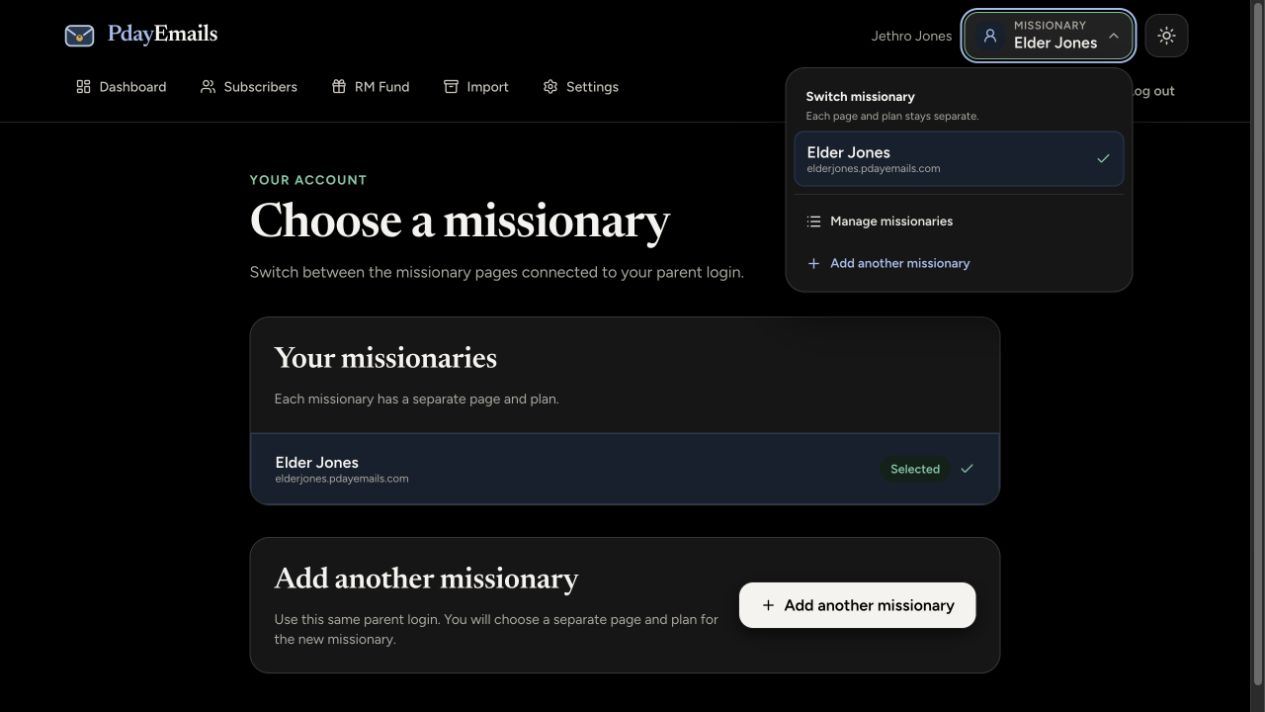
A parent recently asked whether one email address could manage two missionaries in P-Day Emails. Now it can.
Maybe you have twins preparing to leave. Or your younger child is heading to the MTC while an older sibling is still serving. You can now manage both missionaries with the same email address and password.
Each missionary still has their own page, subscriber list, letters, settings, and service plan. Sharing a parent login keeps everything easy to reach without mixing their missions together.
How to add another missionary
- Sign in to your existing P-Day Emails account.
- Open the Missionary menu at the top of the page and choose Add another missionary.
- Enter the next missionary’s name and email address, choose their page username, and continue to select their plan.
Use the Missionary menu at the top right to add another missionary or choose a missionary to manage. The Manage missionaries page also has an Add another missionary button.
You don’t need a second parent email address or a new password. Each missionary needs their own paid plan; adding another missionary does not change the plan you already have.
Switch between their missions
Use the Missionary menu to choose which missionary you want to manage. You can also open Manage missionaries to see the missionaries connected to your login.
When you switch, you’re working with that missionary’s account. Their subscriber list stays separate, their letters stay separate, and their privacy settings stay separate. Your missionaries can keep sending their weekly emails as usual.
If you’re setting up your first missionary, start with the usual signup. Once you’re signed in, you can add another missionary from the same menu.
Existing separate logins are not automatically connected. If you already set up both missionaries under different logins, email support@pdayemails.com before creating another account.
Jethro
P-Day Emails
Want the weekly letter to reach everyone who cares?
Create your missionary’s page